A game that did the same thing every time would be dull. The Guessing Game has to do one thing when you are right and something else when you are wrong. That is a decision.
The decision already in your game
This code below, in checkGuess(), is similar to what is in your own Guessing Game app:
        if guess == secretNumber {
            message = "Yes, \(playerName)! \(secretNumber) is my number."
            messageSymbol = "star.circle.fill"
            messageColor = Color.green
            gameIsOver = true
            gamesWon += 1
        } else {
            // TRY: Change this message. Make it kinder, or sillier.
            message = "\(guess) is not my number. Try again."
            messageSymbol = "hand.thumbsdown.fill"   // or the symbol you chose
            messageColor = Color.orange
        }
Here is the same decision drawn as a flowchart. The diamond is the question, and each arrow out of it is one answer:
graph TD
    A["Check the guess"] --> B{"guess == secretNumber?"}
    B -->|"true"| C["You win"]
    B -->|"false"| D["Not my number. Try again."]
guess == secretNumber is the condition: the question in the diamond. Its answer is true or false.
If the answer is true, Swift follows the true arrow: the code in the first pair of braces { } runs.
Otherwise (else), Swift follows the false arrow: the code in the second pair of braces runs.
Exactly one of the two runs. Never both, never neither. Every path through the flowchart passes through exactly one box.
Comparing two values
How does an app make a decision? It must compare values. Values are compared using comparison operators:
Operator
Asks
true when guess is 40 and secretNumber is 42?
==
equal to?
guess == secretNumber is false
!=
not equal to?
guess != secretNumber is true
<
less than?
guess < secretNumber is true
>
greater than?
guess > secretNumber is false
<=
less than or equal to?
guess <= secretNumber is true
>=
greater than or equal to?
guess >= secretNumber is false
Each comparison results in value that is a Bool, the yes-or-no type from Variables and Data Types: true or false. That is what makes comparisons useful in an if statement.
= is not ==
One = stores a value. Two == compare two values. If you write if guess = secretNumber {, Swift will not run your game, and it even guesses what you meant:
use of '=' in a boolean context, did you mean '=='?
More than two choices
To tell the player “too low” or “too high”, the game needs three possible outcomes, or choices. In the flowchart, that means a second diamond on the false arrow. In the code, it means an else if between the if and the else:
graph TD
    A["Check the guess"] --> B{"guess == secretNumber?"}
    B -->|"true"| C["You win"]
    B -->|"false"| D{"guess < secretNumber?"}
    D -->|"true"| E["Too low"]
    D -->|"false"| F["Too high"]
Swift checks the conditions from the top down. The first one that is true wins, its code runs, and Swift skips the rest. If none is true, the else runs.
In your game: too high, too low
The flowchart above is the decision the game needs, and < is the comparison to be made. Now, you’ll build it. Here is the checkGuess() code that implements the flowchart above:
    func checkGuess() {

        // One more guess has been made.
        guessCount += 1

        if guess == secretNumber {
            message = "Yes, \(playerName)! \(secretNumber) is my number."
            messageSymbol = "star.circle.fill"
            messageColor = Color.green
            gameIsOver = true
            gamesWon += 1
        } else {
	        if guess < secretNumber {
	            message = "\(guess) is too low. Go higher."
	            messageSymbol = "arrow.up.circle.fill"
	            messageColor = Color.blue
	        } else {
	            message = "\(guess) is too high. Go lower."
	            messageSymbol = "arrow.down.circle.fill"
	            messageColor = Color.red
            }
        }
    }
Copy the block with its copy button, select your whole checkGuess() function from func to its closing brace, and press Command-V to replace it. The final else has no condition of its own: by the time Swift reaches it, the guess is neither equal nor less, so the only thing left is “too high”.
At the very top of the file, the comment still says what the game does not do yet. Replace the heading WHAT IT DOES NOT DO YET and the two lines under it with these lines:
// NEW IN LESSON 3// It tells you if your guess is too high or too low.
Test it
Play a game using the strategy you found at the whiteboards on the first day of class – halving the available range of numbers. How many guesses did it take?
Play three more games the same way. Did you ever need more than 7?
Try to get each of the three messages at least once. Which guess makes each branch run, and how do you know the else never runs for a low guess?
Then Commit and Push, with a message such as Added too high and too low.
Try it
Change the symbols and colours for too high and too low to ones you like better.
What happens if you swap < for > in the else if? Predict first, then try it. Then put it back.
Order matters
Let’s say that a game gives a medal for a score out of 100. Look at the code below. It has a bug. Can you see it before you read on?
var medal: String = "No medal"if score >= 50 { medal = "Bronze"} else if score >= 80 { medal = "Gold"}
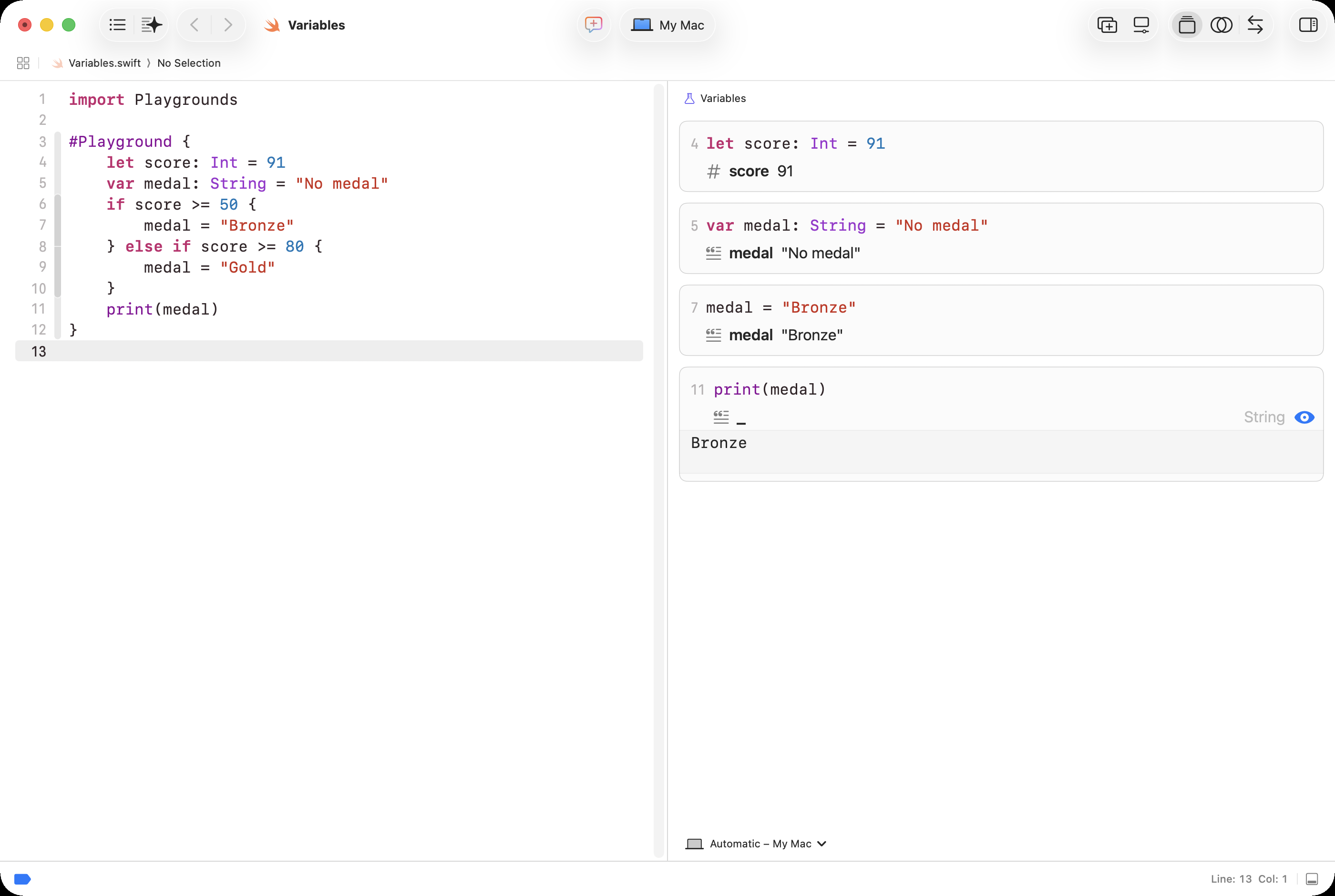
Run the bug. Don’t take my word for it. Make a new playground called Decisions (see Your First Playground for a reminder of how to make a playground).
Copy this block with its copy button, delete the print line between the playground’s braces, and press Command-V to paste this code in it’s place:
let score: Int = 91var medal: String = "No medal"if score >= 50 { medal = "Bronze"} else if score >= 80 { medal = "Gold"}print(medal)
Like this:
A score of 91 gets Bronze. 91 is at least 50, so the first condition is true, and Swift never even looks at the second one. Nobody can ever win Gold.
Swift does not warn you, because nothing here breaks its rules. The code runs. It just does the wrong thing. The fix is to put the hardest condition first:
var medal: String = "No medal"if score >= 80 { medal = "Gold"} else if score >= 65 { medal = "Silver"} else if score >= 50 { medal = "Bronze"} else { medal = "No medal"}
Paste the fixed version over the first, and Gold appears. Then change score to 79, to 50, and to 49, and watch the card change each time. The only way to catch a bug like the first one is to try a score from each branch on purpose, and check what happens.
Practice
Work on paper first, then check yourself in your Decisions playground.
1. Using the fixed medal code, what medal does each score get? 91, 80, 79, 65, 50, 49.
SOLUTION
91 Gold, 80 Gold, 79 Silver, 65 Silver, 50 Bronze, 49 No medal. Notice 80, 65, and 50: >= includes the number itself.
2.roll holds a die roll from 1 to 6. Write a decision that sets message to "Six! Roll again." for a 6, "Oh no, a 1!" for a 1, and "You rolled... x" (with the actual number instead of x) for anything else.
SOLUTION
if roll == 6 { message = "Six! Roll again."} else if roll == 1 { message = "Oh no, a 1!"} else { message = "You rolled... \(roll)."}
The 6 and the 1 can come in either order here, because a roll cannot be both.
3. Which rolls from 1 to 6 would you try, to test your answer to question 2? Why is trying only a 3 not enough?
SOLUTION
At least a 6, a 1, and one other roll, so that every branch runs once. A 3 only tests the else.
Curriculum connection
A1.4
demonstrate the ability to use Boolean operators (e.g., AND, OR, NOT), comparison operators (i.e., equal to, not equal to, greater than, less than, greater than or equal to, less than or equal to), arithmetic operators (e.g., addition, subtraction, multiplication, division, exponentiation, parentheses), and order of operations correctly in computer programs;
For relationships between two variables, expressions, or values: a. Write expressions using relational operators. b. Evaluate expressions that use relational operators.
AAP-2.E.1 A Boolean value is either true or false.
AAP-2.E.2 The exam reference sheet provides the following relational operators: =, ≠, >, <, ≥, and ≤. Text and Block:
a = b
a ≠ b
a > b
a < b
a ≥ b
a ≤ b These are used to test the relationship between two variables, expressions, or values. A comparison using a relational operator evaluates to a Boolean value. For example, a = b evaluates to true if a and b are equal; otherwise, it evaluates to false.
For selection: a. Write conditional statements. b. Determine the result of conditional statements.
AAP-2.H.1 Conditional statements, or “if-statements,” affect the sequential flow of control by executing different statements based on the value of a Boolean expression.
AAP-2.H.2 The exam reference sheet provides
Text:
IF(condition)
{
   <block of statements>
}
Block:
IF condition
   block of statements
in which the code in block of statements is executed if the Boolean expression condition evaluates to true; no action is taken if condition evaluates to false.
AAP-2.H.3 The exam reference sheet provides
Text:
IF(condition)
{
   <first block of statements>
}
ELSE
{
   <second block of statements>
}
Block:
IF condition
   first block of statements
ELSE
   second block of statements
in which the code in first block of statements is executed if the Boolean expression condition evaluates to true; otherwise, the code in second block of statements is executed.